agent 是什么 现在我们可以这样定义 Agent,Agent = 大模型(大脑) + 记忆系统(记忆) + 工具(手脚) + 反馈闭环(学习)。如果一个系统能做到以下四件事,就可以被称为 Agent:
自主性,能根据目标自己规划下一步
记忆,记住上下文、用户偏好、历史决策
工具使用,能调用外部API、脚本、数据库
自我修正,能根据结果调整策略、优化行为
所以简单来说就是 大模型 + 其他能力 = Agent
尝试动手搭建一个最简单的 Agent 之前我们搭建 RAG 时下载了一个 gemma3 模型,正好可以作为 Agent 的大脑。在 LangChain 中,Ollama 通过 langchain-ollama 提供聊天模型集成。
我想实现上网查询最新天气信息的功能,我们创建一个 tool 工具。其语法如下:
1
2
3
4
5
6
from langchain.tools import tool@tool def get_time (city: str ) -> str : """查询某个城市的当前时间。""" return f"{city} 现在是 10:00"
@tool 把函数变成工具。city: str:告诉模型这个工具需要一个字符串参数。”””查询某个城市的当前时间。”””:告诉模型这个工具是干什么的。
在 LangChain v1 里,create_agent 的 tools 参数可以接收 @tool 装饰后的函数。
一个最完整的小示例
1
2
3
4
5
6
7
8
9
10
11
12
13
14
15
16
17
18
19
20
21
22
23
24
25
26
27
28
29
30
31
32
33
34
35
36
import requestsfrom langchain.tools import tool@tool def get_weather (city: str ) -> str : """查询指定城市的当前天气。输入应为城市名。""" geo_resp = requests.get( "https://geocoding-api.open-meteo.com/v1/search" , params={"name" : city, "count" : 1 , "language" : "zh" , "format" : "json" }, timeout=20 , ) geo_resp.raise_for_status() geo_data = geo_resp.json() if not geo_data.get("results" ): return f"没有找到城市“{city} ”" loc = geo_data["results" ][0 ] latitude = loc["latitude" ] longitude = loc["longitude" ] weather_resp = requests.get( "https://api.open-meteo.com/v1/forecast" , params={ "latitude" : latitude, "longitude" : longitude, "current" : ["temperature_2m" , "wind_speed_10m" ], "timezone" : "auto" , }, timeout=20 , ) weather_resp.raise_for_status() weather_data = weather_resp.json() current = weather_data["current" ] return f"{city} 当前温度 {current['temperature_2m' ]} °C,风速 {current['wind_speed_10m' ]} km/h"
好了,让我们继续完成我们的目标。很遗憾,我当前使用的 gemma3 模型版本在 Ollama 中无法正常支持 tool calling,因此这里切换到了 Qwen2.5 模型。
1
2
3
4
5
6
7
8
9
10
11
12
13
14
15
16
17
18
19
20
21
22
23
24
llm = ChatOllama( model="modelscope2ollama-registry.azurewebsites.net/qwen/Qwen2.5-7B-Instruct-gguf:latest" , temperature=0 , ) agent = create_agent( model=llm, tools=[get_weather], system_prompt=( "你是一个中文智能助手。" "当用户询问天气、温度、湿度、风速、是否带伞等实时信息时,优先调用 get_weather 工具。" "回答温柔一点。" ), ) result = agent.invoke( { "messages" : [ {"role" : "user" , "content" : "帮我查一下南京市现在的天气,并简单建议我要不要带伞。" } ] } ) print (result["messages" ][-1 ].content)
运行这两段代码,就可以得到任意城市的天气了。
但是现在每次都要在 notebook 中修改信息,再点击运行才能提问,AI 告诉我可以使用 Gradio 工具来搭建一个简单网页聊天页面。我们使用 pip 安装 gradio,接下来,我们将代码替换成这个
1
2
3
4
5
6
7
8
9
10
11
12
13
14
15
16
17
18
import gradio as grSESSION_ID = "session_1" def bot (message, history ): result = agent.invoke( { "messages" : [ {"role" : "user" , "content" : message} ] }, config={"configurable" : {"thread_id" : SESSION_ID}} ) reply = result["messages" ][-1 ].content return reply demo = gr.ChatInterface(fn=bot, title="天气助手" ) demo.launch(server_name="127.0.0.1" , inbrowser=True )
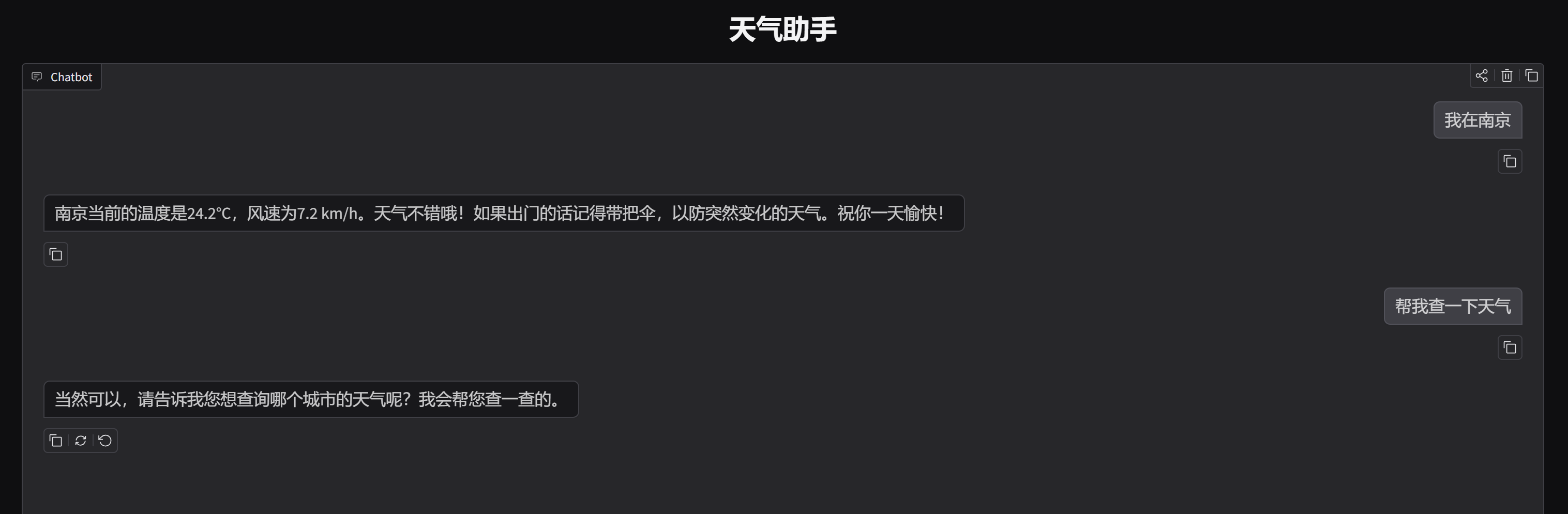
运行,我们就成功打开了一个网站,这样就可以和 agent 更流畅的对话了。
图 1 网页端
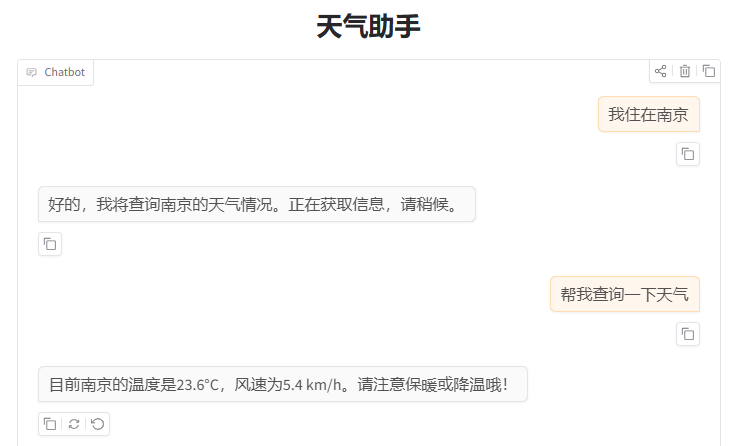
遗憾的是,现在还没有记忆功能。接下来我想实现记忆功能。使用 LangChain 中的 checkpointer 实现此功能。完整代码如下:
1
2
3
4
5
6
7
8
9
10
11
12
13
14
15
16
17
18
19
20
21
22
23
24
25
26
27
28
29
30
31
32
33
34
35
36
37
38
39
40
41
42
43
44
45
46
47
48
49
50
51
52
53
54
55
56
57
58
59
60
61
62
63
64
65
66
67
68
69
70
71
72
73
74
75
76
77
78
79
80
81
import requestsimport gradio as grfrom langchain.tools import toolfrom langchain.agents import create_agentfrom langchain_ollama import ChatOllamafrom langgraph.checkpoint.memory import InMemorySaver@tool def get_weather (city: str ) -> str : """查询指定城市的当前天气。输入应为城市名。""" geo_resp = requests.get( "https://geocoding-api.open-meteo.com/v1/search" , params={"name" : city, "count" : 1 , "language" : "zh" , "format" : "json" }, timeout=20 , ) geo_resp.raise_for_status() geo_data = geo_resp.json() if not geo_data.get("results" ): return f"没有找到城市“{city} ”" loc = geo_data["results" ][0 ] latitude = loc["latitude" ] longitude = loc["longitude" ] weather_resp = requests.get( "https://api.open-meteo.com/v1/forecast" , params={ "latitude" : latitude, "longitude" : longitude, "current" : ["temperature_2m" , "wind_speed_10m" ], "timezone" : "auto" , }, timeout=20 , ) weather_resp.raise_for_status() weather_data = weather_resp.json() current = weather_data["current" ] return f"{city} 当前温度 {current['temperature_2m' ]} °C,风速 {current['wind_speed_10m' ]} km/h" llm = ChatOllama( model="modelscope2ollama-registry.azurewebsites.net/qwen/Qwen2.5-7B-Instruct-gguf:latest" , temperature=0 , ) checkpointer = InMemorySaver() agent = create_agent( model=llm, tools=[get_weather], checkpointer = checkpointer, system_prompt=( "你是一个中文天气助手。" "你具有短期对话记忆,会参考同一会话中用户前面说过的话。" "如果用户已经在前文说明了所在城市,后续查询天气时应优先利用这个上下文。" "当用户询问天气、温度、风速、是否带伞等实时信息时,优先调用 get_weather 工具。" "不要编造天气数据。" ), ) import gradio as grSESSION_ID = "session_1" def bot (message, history ): result = agent.invoke( { "messages" : [ {"role" : "user" , "content" : message} ] }, config={"configurable" : {"thread_id" : SESSION_ID}} ) reply = result["messages" ][-1 ].content return reply demo = gr.ChatInterface(fn=bot, title="天气助手" ) demo.launch(server_name="127.0.0.1" , inbrowser=True )
现在,我们实现了一个最小 Agent – 天气助手。
图 2 实现记忆功能
但是每次都要在 notebook 中运行太麻烦了,下次我们尝试一下接入不同 APP 的 api。