0%

MCP 学习

MCP 是什么

  让我们来回顾一下 MCP 的概念,MCP 是 Model Context Protocol,翻译成中文就是模型上下文协议。简单来说,MCP 就是让大模型能更好地使用各类工具的一个协议。MCP 协议中有 MCP Server 和 MCP Client。

  MCP Server 只是一个应用程序而已,其执行符合 MCP 协议。MCP Server 中包含多个 Tool,每个 Tool 都可以实现不同的功能。在 Cline 中可以安装不同 MCP Server 来实现模型拥有不同功能。

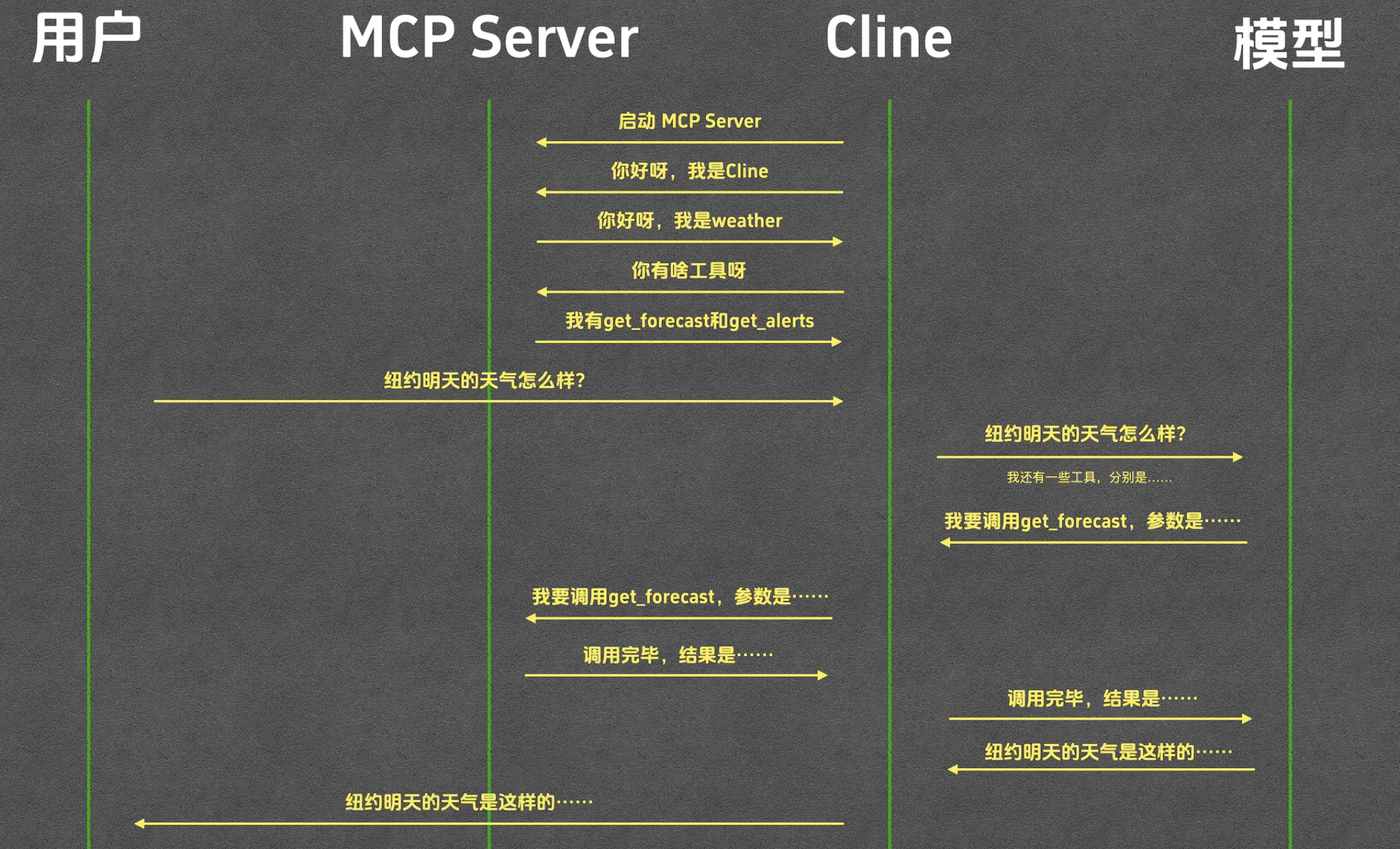
  接下来我们来详细看一下 MCP 地交互流程。以获取天气为例,MCP Server 中有两个工具 get_forecast 和 get_alerts。当 Cline 启动时,会启动 MCP Server,并确定工具列表。用户提出问题到 cline,cline 再将问题加上注册好的 MCP_Server、工具列表信息转发给模型,于是模型会让 cline 调用这两个工具获得答案,工具返回答案给 cline,cline 再转发给模型,最后模型生成一份自然语言报告,并发送给 cline,最终 cline 发送给用户。


图 1 完整调用流程
  

动手写一个 MCP Server

  接下来我们来手动写一个 MCP 实现查询天气的程序。新建文件夹,进入后在终端输入

uv init weather
uv venv
uv add "mcp[cli]" httpx

  再使用 vscode 打开 weather 文件夹就可以进行开发了。新建 weather.py 文件,写入以下代码

1
2
3
4
5
6
7
8
9
10
11
from typing import Any
import httpx
from mcp.server.fastmcp import FastMCP

# 创建 MCP 服务器对象,weather 是名字,log_level 表示只有错误会被记录在日志中。
mcp = FastMCP("weather", log_level="ERROR")

# 美国天气 API
NWS_API_BASE = "https://api.weather.gov"
# 表示什么应用在访问 API
USER_AGENT = "weather-app/1.0"

  接下来我们实现发送请求函数:

1
2
3
4
5
6
7
8
9
10
11
12
13
14
15
16
17
18
19
20
21
22
23
# 向 NWS 天气 API 发起请求
# 核心任务:访问 url,得到返回结果,转换为 Python 字典,如果失败就返回 none
# async 表示这是一个异步函数
async def make_nws_request(url: str) -> dict[str, Any] | None:
"""Make a request to the NWS API with proper error handling."""

# 请求头,告诉服务器身份、想要的数据格式
headers = {
"User-Agent": USER_AGENT,
"Accept": "application/geo+json"
}

# 创建一个异步 HTTP 客户端,用完后自动关闭连接。
async with httpx.AsyncClient() as client:
try:
# 发送请求
response = await client.get(url, headers=headers, timeout=30.0)
# 检测是否异常
response.raise_for_status()
# 将 JSON 字符串转换为字典并返回
return response.json()
except Exception:
return None

  接下来我们实现将预警信息转为字符串的函数。

1
2
3
4
5
6
7
8
9
10
# 天气预警数据转字符串
def format_alert(feature: dict) -> str:
props = feature["properties"]
return f"""
Event: {props.get('event','unkown')}
Area: {props.get('areaDesc','unkown')}
Severity: {props.get('severity','unkown')}
Description: {props.get('description','unkown')}
Instructions: {props.get('instruction','unkown')}
"""

  接下来我们第一个 Tool:get_alerts,其用于获取美国某个州的天气预警信息。

1
2
3
4
5
6
7
8
9
10
11
12
13
14
15
16
17
18
19
20
@mcp.tool()
async def get_alerts(state: str) -> str:
"""Get weather alerts for a US state.

Args:
state: Two-letter US state code (eg CA,NY)
"""

url = f"{NWS_API_BASE}/alerts/active/area/{state}"
data = await make_nws_request(url)

if not data or "features" not in data:
return "Unable to fetch alerts or no alerts found."

if not data["features"]:
return "No active alerts for this state."

alerts = [format_alert(feature) for feature in data["features"]]
# 把结果用 --- 分割
return "\n---\n".join(alerts)

  接下来我们编写第二个 Tool,获取具体地点的天气信息:

1
2
3
4
5
6
7
8
9
10
11
12
13
14
15
16
17
18
19
20
21
22
23
24
25
26
27
28
29
30
31
32
33
34
35
36
@mcp.tool()
async def get_forecast(latitude: float, longitude: float) -> str:
"""Get weather forecast for a location.

Args:
latitude:Latitude of the location
longitude:Longitude of the location
"""
# 首先获取信息
points_url = f"{NWS_API_BASE}/points/{latitude},{longitude}"
points_data = await make_nws_request(points_url)

if not points_data:
return "Unable to fetch data for this location"

forecast_url = points_data["properties"]["forecast"]
forecast_data = make_nws_request(forecast_url)

if not forecast_data:
return "Unable to fetch data."

periods = forecast_data["properties"]["periods"]
forecasts = []
for period in periods[:5]: # Only show next 5 periods
forecast = f"""
{period['name']}:
Temperature: {period['temperature']}°{period['temperatureUnit']}
Wind: {period['windSpeed']} {period['windDirection']}
Forecast: {period['detailedForecast']}
"""
forecasts.append(forecast)

return "\n---\n".join(forecasts)

if __name__ == "__main__":
mcp.run(transport = 'stdio')

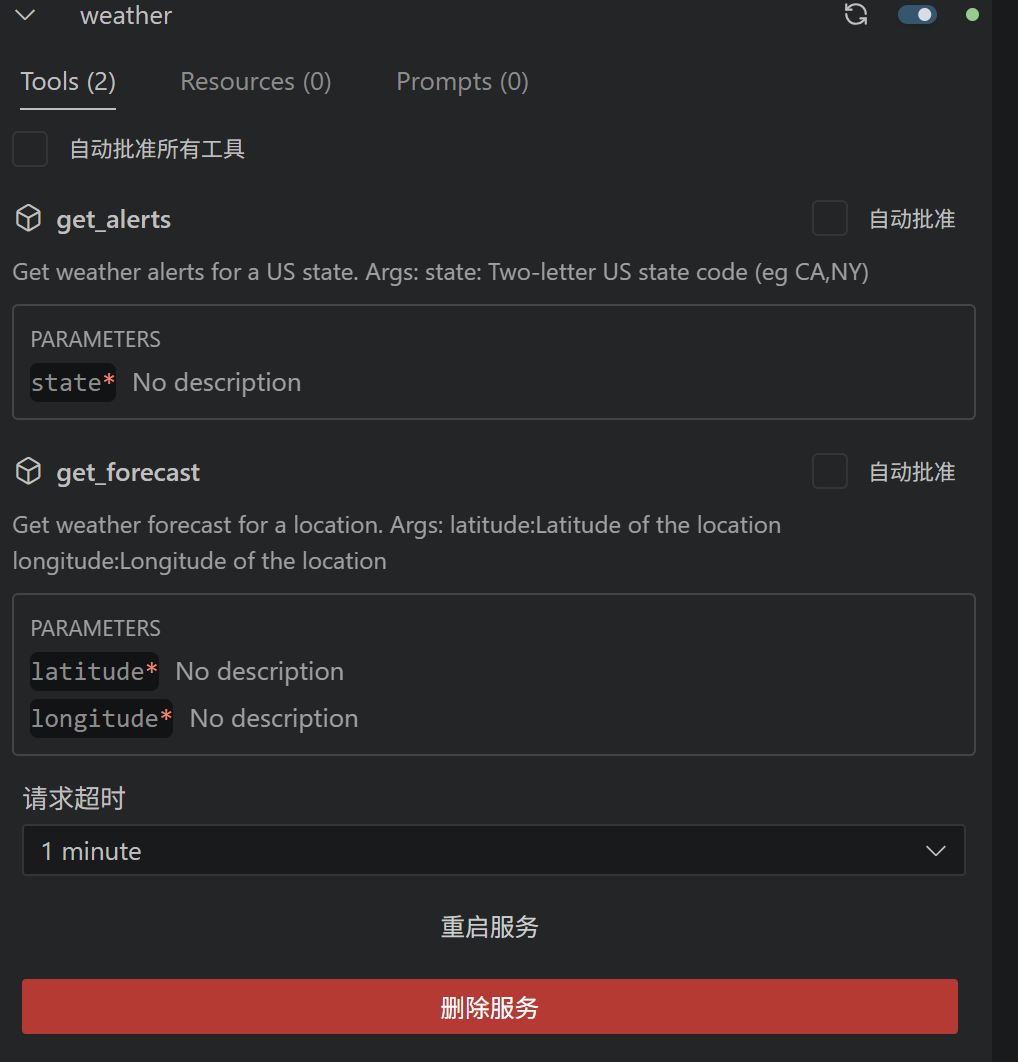
  接下来将工具添加到 Cline 中,这一步就不具体演示了。


图 2 成功添加到 Cline
  

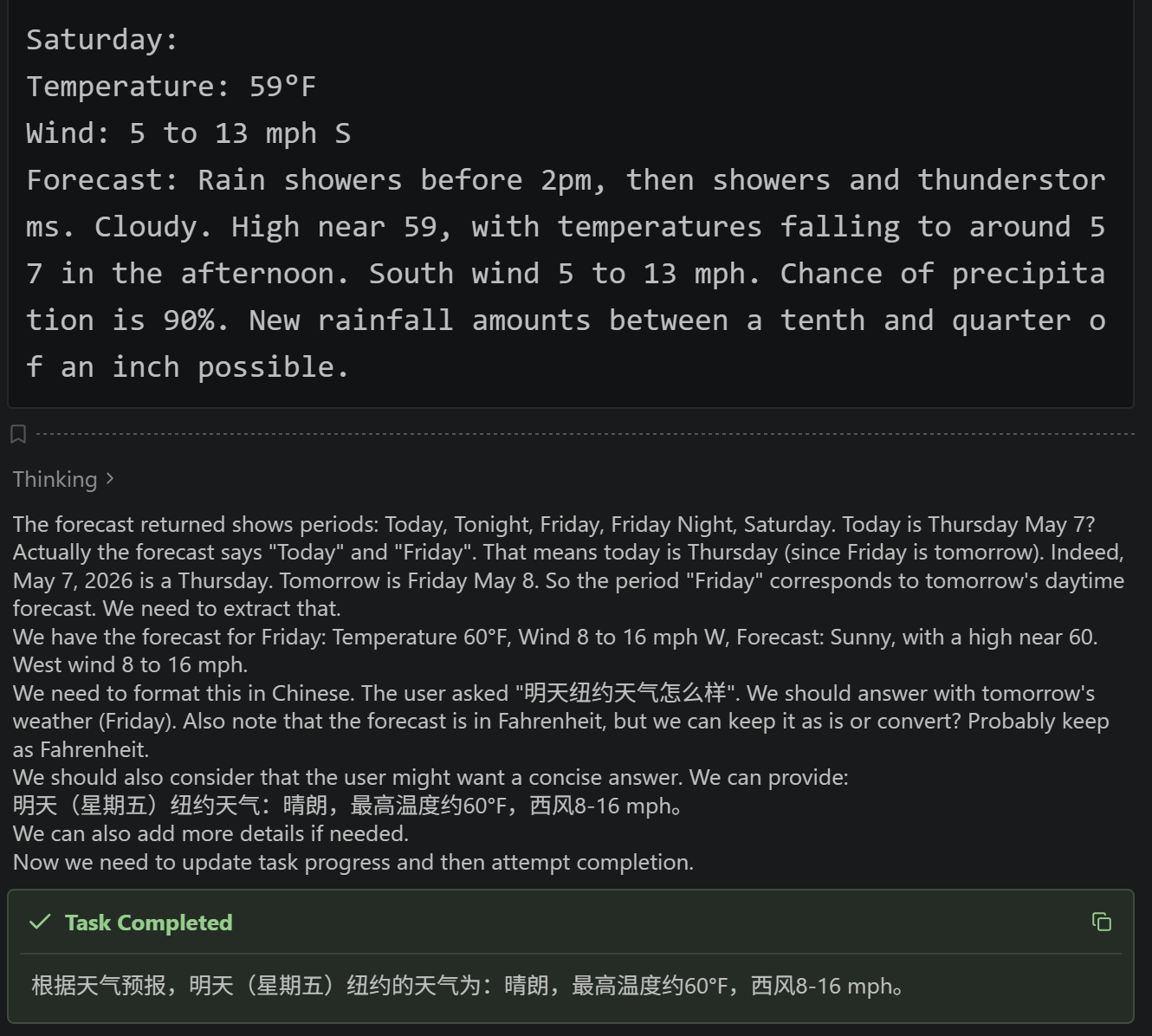
  接下来询问大模型“明天纽约天气怎么样?”,可以看到大模型调用工具的过程:


图 3 调用工具
  

Cline 与 MCP Server 的交互

  为了研究 MCP Server 和 Cline 的数据交互,我们使用 AI 来写一个中间程序,具体实现如下:

1
2
3
4
5
6
7
8
9
10
11
12
13
14
15
16
17
18
19
20
21
22
23
24
25
26
27
28
29
30
31
32
33
34
35
36
37
38
39
40
41
42
43
44
45
46
47
48
49
50
51
52
53
54
55
56
57
58
59
60
61
62
63
64
65
66
67
68
69
70
71
72
73
74
75
76
77
78
79
80
81
82
83
84
85
86
87
88
89
90
91
92
93
94
95
96
97
98
99
100
101
102
103
104
105
106
107
108
109
110
111
112
113
114
115
116
117
118
119
120
121
122
123
124
125
126
"""
MCP Logger - A proxy that sits between Cline and an MCP Server,
logging all communication (stdin/stdout) to a file.

Usage:
python mcp_logger.py <command> [args...]

Example in MCP settings, replace:
"command": "uv", "args": ["--directory", "E:/python_learn/MCP/weather/", "run", "weather.py"]
With:
"command": "python", "args": ["E:/python_learn/MCP/weather/mcp_logger.py", "uv", "--directory", "E:/python_learn/MCP/weather/", "run", "weather.py"]
"""

import sys
import subprocess
import threading
import os
import time
from datetime import datetime

# Log file path
LOG_DIR = os.path.dirname(os.path.abspath(__file__))
LOG_FILE = os.path.join(LOG_DIR, "mcp_log.log")


def log(direction: str, data: bytes):
"""Write a log entry with timestamp and direction."""
timestamp = datetime.now().strftime("%Y-%m-%d %H:%M:%S.%f")[:-3]
try:
text = data.decode("utf-8")
except UnicodeDecodeError:
text = repr(data)
with open(LOG_FILE, "a", encoding="utf-8") as f:
f.write(f"[{timestamp}] {direction}\n{text}\n{'='*80}\n")


def forward_stdin(proc):
"""Read from our stdin (Cline) and forward to the child process (MCP Server)."""
try:
while True:
data = sys.stdin.buffer.read(1)
if not data:
proc.stdin.close()
break
# Buffer: read all available data
remaining = sys.stdin.buffer.read1(65536) if hasattr(sys.stdin.buffer, 'read1') else b""
chunk = data + remaining
log("CLIENT -> SERVER", chunk)
proc.stdin.write(chunk)
proc.stdin.flush()
except (OSError, ValueError):
pass


def forward_stdout(proc):
"""Read from child process stdout (MCP Server) and forward to our stdout (Cline)."""
try:
while True:
data = proc.stdout.read(1)
if not data:
break
remaining = proc.stdout.read1(65536) if hasattr(proc.stdout, 'read1') else b""
chunk = data + remaining
log("SERVER -> CLIENT", chunk)
sys.stdout.buffer.write(chunk)
sys.stdout.buffer.flush()
except (OSError, ValueError):
pass


def forward_stderr(proc):
"""Read from child process stderr and log it."""
try:
while True:
data = proc.stderr.read(1)
if not data:
break
remaining = proc.stderr.read1(65536) if hasattr(proc.stderr, 'read1') else b""
chunk = data + remaining
log("SERVER STDERR", chunk)
sys.stderr.buffer.write(chunk)
sys.stderr.buffer.flush()
except (OSError, ValueError):
pass


def main():
if len(sys.argv) < 2:
print("Usage: python mcp_logger.py <command> [args...]", file=sys.stderr)
sys.exit(1)

cmd = sys.argv[1:]

with open(LOG_FILE, "w", encoding="utf-8") as f:
f.write(f"MCP Logger started at {datetime.now().isoformat()}\n")
f.write(f"Command: {' '.join(cmd)}\n")
f.write(f"{'='*80}\n")

proc = subprocess.Popen(
cmd,
stdin=subprocess.PIPE,
stdout=subprocess.PIPE,
stderr=subprocess.PIPE,
)

t_in = threading.Thread(target=forward_stdin, args=(proc,), daemon=True)
t_out = threading.Thread(target=forward_stdout, args=(proc,), daemon=True)
t_err = threading.Thread(target=forward_stderr, args=(proc,), daemon=True)

t_in.start()
t_out.start()
t_err.start()

proc.wait()
# Give threads time to flush
t_out.join(timeout=2)
t_err.join(timeout=2)

with open(LOG_FILE, "a", encoding="utf-8") as f:
f.write(f"\nMCP Logger ended at {datetime.now().isoformat()}, exit code: {proc.returncode}\n")

sys.exit(proc.returncode)


if __name__ == "__main__":
main()

  接下来我们再问一遍 “明天纽约天气怎么样”,可以看到 log 文件中出现了完整的数据。其中,Client 表示 Cline,Server 就是本地运行的 weather.py MCP Server。

1
2
3
4
5
6
7
8
9
10
11
12
13
14
15
16
17
18
19
20
21
22
23
24
25
26
27
28
29
30
31
32
33
34
35
36
37
38
39
40
41
42
43
44
45
46
47
48
49
50
51
52
53
54
55
56
57
58
59
60
61
62
63
64
65
66
67
68
69
70
71
72
73
74
75
76
77
78
79
80
81
82
83
84
85
86
87
88
89
90
91
92
93
94
95
96
97
98
99
100
101
102
103
104
105
106
107
108
109
110
111
112
113
114
115
116
117
118
MCP Logger started at 2026-05-08T14:40:13.330040
Command: uv --directory E:/python_learn/MCP/weather/ run weather.py

# 平台向服务器发送信息,表明 MCP 协议版本、平台自身信息等等。
[2026-05-08 14:40:13.341] CLIENT -> SERVER
{"jsonrpc":"2.0","id":0,"method":"initialize","params":{"protocolVersion":"2025-06-18","capabilities":{"elicitation":{}},"clientInfo":{"name":"codex-mcp-client","title":"Codex","version":"0.129.0-alpha.15"}}}

# 服务器向平台发送消息,表明 MCP 协议版本,表明自身不支持的能力,发送服务器的信息。
[2026-05-08 14:40:14.179] SERVER -> CLIENT
{"jsonrpc":"2.0","id":0,"result":{"protocolVersion":"2025-06-18","capabilities":{"experimental":{},"prompts":{"listChanged":false},"resources":{"subscribe":false,"listChanged":false},"tools":{"listChanged":false}},"serverInfo":{"name":"weather","version":"1.27.0"}}}

# 平台表明收到
[2026-05-08 14:40:14.179] CLIENT -> SERVER
{"jsonrpc":"2.0","method":"notifications/initialized"}

# 平台想要进一步获取工具列表
[2026-05-08 14:40:14.179] CLIENT -> SERVER
{"jsonrpc":"2.0","id":1,"method":"tools/list","params":{"_meta":{"progressToken":0}}}


[2026-05-08 14:40:14.181] SERVER -> CLIENT
{
"jsonrpc": "2.0",
"id": 1,
"result": {
"tools": [
{
# 工具 1
"name": "get_alerts",
"description": "Get weather alerts for a US state.\n\nArgs:\n state: Two-letter US state code (eg CA,NY)\n",
# 用于描述 input json 的格式
"inputSchema": {
"properties": {
"state": {
"title": "State",
"type": "string"
}
},
"required": [
"state"
],
"title": "get_alertsArguments",
"type": "object"
},
"outputSchema": {
"properties": {
"result": {
"title": "Result",
"type": "string"
}
},
"required": [
"result"
],
"title": "get_alertsOutput",
"type": "object"
}
},
{
# 工具 2
"name": "get_forecast",
"description": "Get weather forecast for a location.\n\nArgs:\n latitude:Latitude of the location\n longitude:Longitude of the location\n",
"inputSchema": {
"properties": {
"latitude": {
"title": "Latitude",
"type": "number"
},
"longitude": {
"title": "Longitude",
"type": "number"
}
},
"required": [
"latitude",
"longitude"
],
"title": "get_forecastArguments",
"type": "object"
},
"outputSchema": {
"properties": {
"result": {
"title": "Result",
"type": "string"
}
},
"required": [
"result"
],
"title": "get_forecastOutput",
"type": "object"
}
}
]
}
}

# 询问有无资源可以使用
[2026-05-08 14:40:14.973] CLIENT -> SERVER
{"jsonrpc":"2.0","id":2,"method":"resources/list","params":{"_meta":{"progressToken":1}}}

# 询问有无资源模板可以使用
[2026-05-08 14:40:14.974] CLIENT -> SERVER
{"jsonrpc":"2.0","id":3,"method":"resources/templates/list","params":{"_meta":{"progressToken":2}}}

[2026-05-08 14:40:14.977] SERVER -> CLIENT
{"jsonrpc":"2.0","id":2,"result":{"resources":[]}}

[2026-05-08 14:40:14.978] SERVER -> CLIENT
{"jsonrpc":"2.0","id":3,"result":{"resourceTemplates":[]}}

# 平台调用 get_forecast 工具并输入经纬度
[2026-05-08 15:02:34.565] CLIENT -> SERVER
{"method":"tools/call","params":{"name":"get_forecast","arguments":{"latitude":40.7128,"longitude":-74.006}},"jsonrpc":"2.0","id":5}

[2026-05-08 15:02:36.344] SERVER -> CLIENT
{"jsonrpc":"2.0","id":5,"result":{"content":[{"type":"text","text":"\nOvernight:\nTemperature: 50°F\nWind: 8 mph N\nForecast: A slight chance of rain showers before 5am. Mostly cloudy, with a low around 50. North wind around 8 mph. Chance of precipitation is 20%.\n\n---\n\nFriday:\nTemperature: 60°F\nWind: 8 to 17 mph W\nForecast: Mostly sunny, with a high near 60. West wind 8 to 17 mph.\n\n---\n\nFriday Night:\nTemperature: 51°F\nWind: 2 to 15 mph S\nForecast: A slight chance of rain showers after 2am. Mostly cloudy. Low around 51, with temperatures rising to around 54 overnight. South wind 2 to 15 mph. Chance of precipitation is 20%.\n\n---\n\nSaturday:\nTemperature: 60°F\nWind: 6 to 13 mph S\nForecast: Rain showers likely before 2pm, then showers and thunderstorms. Cloudy. High near 60, with temperatures falling to around 56 in the afternoon. South wind 6 to 13 mph. Chance of precipitation is 90%. New rainfall amounts between a tenth and quarter of an inch possible.\n\n---\n\nSaturday Night:\nTemperature: 53°F\nWind: 5 to 12 mph SW\nForecast: Showers and thunderstorms likely before 2am. Mostly cloudy, with a low around 53. Southwest wind 5 to 12 mph. Chance of precipitation is 70%. New rainfall amounts between a tenth and quarter of an inch possible.\n"}],"structuredContent":{"result":"\nOvernight:\nTemperature: 50°F\nWind: 8 mph N\nForecast: A slight chance of rain showers before 5am. Mostly cloudy, with a low around 50. North wind around 8 mph. Chance of precipitation is 20%.\n\n---\n\nFriday:\nTemperature: 60°F\nWind: 8 to 17 mph W\nForecast: Mostly sunny, with a high near 60. West wind 8 to 17 mph.\n\n---\n\nFriday Night:\nTemperature: 51°F\nWind: 2 to 15 mph S\nForecast: A slight chance of rain showers after 2am. Mostly cloudy. Low around 51, with temperatures rising to around 54 overnight. South wind 2 to 15 mph. Chance of precipitation is 20%.\n\n---\n\nSaturday:\nTemperature: 60°F\nWind: 6 to 13 mph S\nForecast: Rain showers likely before 2pm, then showers and thunderstorms. Cloudy. High near 60, with temperatures falling to around 56 in the afternoon. South wind 6 to 13 mph. Chance of precipitation is 90%. New rainfall amounts between a tenth and quarter of an inch possible.\n\n---\n\nSaturday Night:\nTemperature: 53°F\nWind: 5 to 12 mph SW\nForecast: Showers and thunderstorms likely before 2am. Mostly cloudy, with a low around 53. Southwest wind 5 to 12 mph. Chance of precipitation is 70%. New rainfall amounts between a tenth and quarter of an inch possible.\n"},"isError":false}}

  在最后,Cline 拿到返回结果后与 MCP 的交互就结束了,Cline 会将这个结果发送给大模型,让模型来总结。

结语

  综上所述,MCP 协议主要规定了以下两个内容。
  1、每一个 MCP Server 有哪些函数可以使用。
  2、如何调用这些函数。
  需要注意的是,MCP 协议只规定了 MCP Server 和 平台如何通信,与模型无关